
Bible Widgets
Monkey Taps LLCLifestyle
4.9397.00 Reviews
- Version
- 4.93.0
- Installs
- 100.00K
- Age Rating
- Everyone
Screenshots

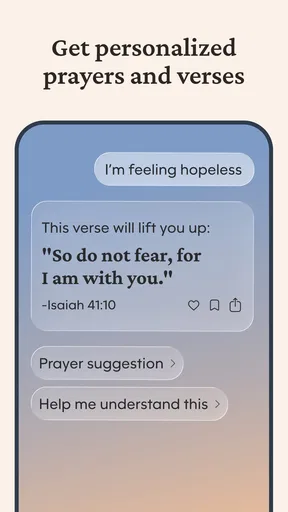
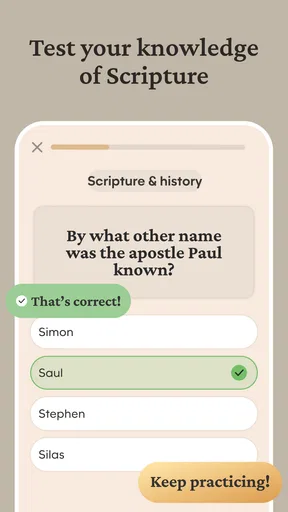
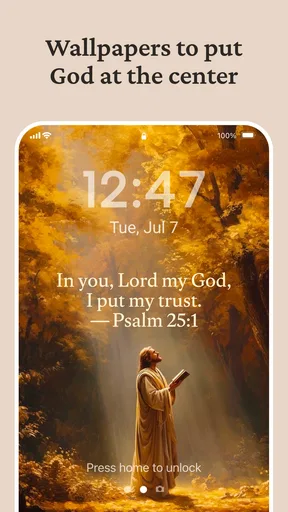
Our Review of Bible Widgets
 Analysis by Appyee
Before I judge whether a verse-on-screen app is worth making room for, I look at how it fits into an ordinary phone routine. Bible Widgets is a lifestyle app from Monkey Taps LLC that brings scripture into view through home-screen widgets. Its appeal is simple: instead of opening a Bible app only when I remember, I can keep a passage where I already glance throughout the day.
What the free starting point means
The app is free to download, which makes it easy to try without committing money up front. It also offers in-app purchases priced from $14.99 to $149.99 per item. That range is worth noticing before you buy anything: free access and paid options are different parts of the value question, and I wouldn’t treat the presence of purchases as a reason to pay automatically.
In practical terms, I’d start with the free experience and decide whether the widget earns a permanent spot on my screen. If it becomes part of a routine, then it makes sense to look carefully at what a paid option actually includes before spending. I would judge that purchase by a clear personal need, not by the assumption that a higher price must mean a better devotional experience.
What the widget changes about daily reading
A regular Bible app is often better when I want to search a passage, follow a reading plan, or settle in for a longer study session. A widget serves a different purpose: it can put a brief prompt in the path of a habit I already have, such as checking the time or opening my phone between tasks. That low-friction reminder is the strongest reason I’d choose this format.
There’s a useful distinction between seeing a verse and studying it. A short passage can prompt reflection, but it doesn’t necessarily provide the context I need to understand a chapter or interpret a difficult line. I’d use the home-screen view as a starting point, then open a Bible or trusted study resource when I want more than a moment of encouragement.
One practical way to get more from it is to connect the widget to a specific pause rather than expecting it to transform the whole day. I might read the verse before a meeting, during a quiet breakfast, or while waiting for a family member. A familiar moment gives the reminder somewhere to land; otherwise, it can become just another item on a busy screen.
Personalization, with a useful limit
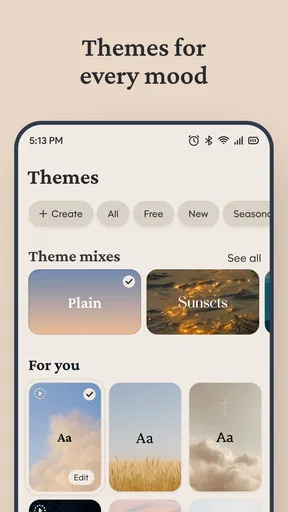
The original experience offers widget styles and ways to choose scripture, including themes and random verses. That flexibility can help the display feel personal instead of like a generic block of text. I’d choose a design that keeps the words easy to read at a glance, even if a more decorative option looks better in a screenshot.
Random selection is appealing when I want variety, but it may not suit every purpose. If I’m working through a particular book or trying to follow a theme over time, a chosen passage is more useful than an unexpected one. Switching between deliberate selection and a surprise verse is a small workflow choice that can make the app feel either focused or casual, depending on what I need that day.
How I’d fit it into a real day
Picture a weekday morning when I’m getting ready and checking messages before work. A verse already on the home screen gives me a chance to pause without opening another app or searching for a reading. Later, if the wording stays with me, I can use the app’s reading and saved-verse options to revisit it rather than relying on memory.
That workflow is most helpful when I treat the widget as a doorway, not a substitute for every part of a faith practice. I can glance at it when time is short, save a passage that matters, and return for a fuller reading when I have the attention to do so. Keeping those steps separate avoids expecting a small widget to do the work of a complete study routine.
There’s also a screen-space tradeoff. A widget is useful because it stays visible, but every home-screen element competes for attention. If I already use a crowded layout or tend to dismiss things I see too often, I’d keep the setup simple and give the scripture a place where I’ll notice it without making the screen feel cluttered.
What’s the Buzz About?
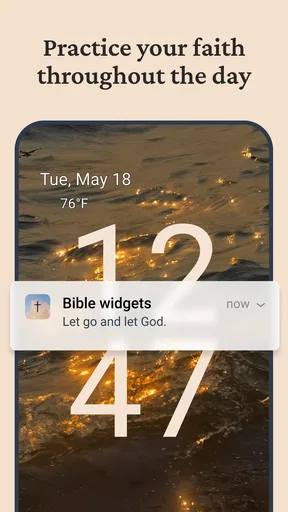
Alright, first things first. Bible Widgets is an app designed to bring daily scripture to your home screen. You know how sometimes you just need that little nudge of wisdom or comfort? That's where this app shines. It’s like having a mini devotional right there, ready to guide you through the day.
The setup is super straightforward. Once you download the app, you can choose from a variety of widget styles that fit your aesthetic. Whether you’re into the minimalistic look or something a bit more decorative, there’s something here for everyone. Just pick your preferred style, select the scripture you want to see, and boom – you’re all set!
Features That Stand Out
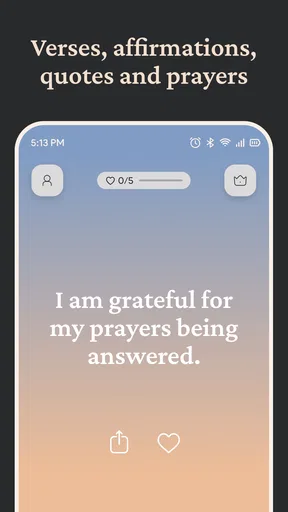
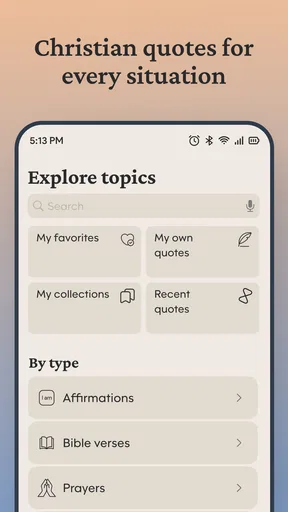
One of the things I love about Bible Widgets is its variety. You’re not limited to just one verse a day. Oh no! You can personalize it by selecting different passages, themes, or even get a random verse if you’re feeling adventurous. It’s like a little surprise each day!
Plus, the app doesn’t just stop at the widgets. There’s an entire section dedicated to deeper study. You can read full chapters, explore different translations, and even save your favorite verses for quick access later. It’s like having a pocket-sized Bible study group with you wherever you go.
Usability and Design
Let’s talk user experience, shall we? Navigating through the app is a breeze. It’s intuitive and clean, which is a big win in my book. No one wants to fumble around just to get a little daily inspiration, right?
The design is sleek and modern, yet it doesn’t lose that warm, inviting touch. I found the color schemes quite soothing, which makes the reading experience even more enjoyable. Whether you’re a tech-savvy individual or someone who’s just starting out with apps, Bible Widgets makes it easy for everyone to feel at home.
Why You’ll Love It
Imagine starting your day with a sense of calm and purpose. That’s exactly what Bible Widgets aims to do. It’s like your little piece of tranquility amidst the chaos of everyday life. Plus, it’s a great tool for anyone looking to deepen their faith without having to carve out huge chunks of time.
I’ve found that having those verses right on my home screen is a gentle reminder to pause and reflect, no matter how hectic the day gets. It’s a small change, but it makes a world of difference in how I approach my daily challenges.
Who will get the most from it?
I’d recommend it most to someone who already wants scripture in their daily routine but often forgets to open a dedicated reading app. The widget approach makes the reminder visible without requiring a fresh search each time. It may also suit someone who enjoys choosing passages or themes and wants a quick route back to verses they have saved.
It’s less suited to readers who want structured study to be the app’s central purpose, or who prefer a long, guided devotional with commentary and a planned sequence. For those needs, a full-featured Bible or study app is likely a better primary tool. I’d also skip the widget approach if seeing the same kind of prompt on the home screen would quickly become background noise; visibility only helps when it still catches your attention.
Small tradeoffs worth considering
Widgets are glanceable by design, so they favor short moments over sustained reading. Even when a verse sparks a useful thought, a home-screen display can’t replace the context of reading around it. I’d be mindful of that, especially when a passage is unfamiliar: use the quick view as an invitation to read further rather than as the whole explanation.
Personalization also asks for a little initial attention. Choosing a style and deciding whether to select passages or let verses vary can make the experience feel more intentional, but it still requires a decision about how you want to use it. My tip is to begin with the simplest setup and only adjust it when you notice a specific annoyance, such as text that’s hard to scan or a selection pattern that doesn’t fit your routine.
The app is free, but that doesn’t settle whether any purchase is worthwhile. With paid items ranging from $14.99 to $149.99, I’d check the exact offer and its relevance to my use before buying. Someone who only wants a scripture reminder may find the free starting point enough; someone considering a paid item should be able to name the extra value they expect from it.
How it compares with familiar alternatives
Compared with opening a standard Bible app, a widget reduces the steps between unlocking the phone and seeing a passage. In return, it uses space on the home screen and encourages short reading rather than a focused session. Compared with a printed devotional, it is easier to keep close at hand, while a book can offer a more deliberate, distraction-free pause.
I see this as a companion to those alternatives, not an automatic replacement. If I’m searching for a passage or reading a complete chapter, I’d choose a Bible app. If I want a physical routine away from my phone, a printed book may serve me better. If my main problem is remembering to pause, a visible widget has a clear advantage.
Availability and practical fit
The app is rated for Everyone, and its average rating is 4.9 from around eleven thousand ratings, with about three hundred eighty written reviews. It has over one hundred thousand installs. Those figures suggest that many people have chosen to try it, but I’d still base my decision on whether its particular widget-centered approach suits me.
It was released on May 26, 2025, and version 4.93.0 is listed for devices running OS 8.0 or later. Before installing, I’d check that my device meets that minimum and that I’m comfortable adding a widget to my home screen. These practical details matter more than a polished appearance if I’m choosing an app for daily use.
Final Thoughts
So, if you’re on the hunt for an app that combines spirituality with a touch of personal flair, give Bible Widgets a try. It’s like having a little piece of serenity with you at all times. Whether you’re at work, at home, or on the go, it keeps you connected to what truly matters.
Honestly, I think it’s a fantastic addition to anyone’s digital repertoire. Easy to use, beautifully designed, and spiritually enriching – what’s not to love? Go ahead, download it, and let it bring a little more light into your life. Trust me, you won’t regret it!
My buy-or-skip verdict
I’d try it if a home-screen verse would help me build a small pause into the day, and I’d begin with the free access before considering an in-app purchase. The strongest value is convenience: scripture is placed where I’m likely to see it, and the app gives me ways to make that prompt feel personal.
I’d skip it as my main Bible resource if I needed an organized study plan, substantial commentary, or a phone-free devotional habit. For everyone else, it’s a focused idea with a clear purpose. Whether it earns a lasting place on your screen depends on one honest test: does seeing a verse there help you stop and read, or do you eventually swipe past it?
Verdict
Strengths of Bible Widgets
- Customizable widget designs.
- Wide range of Bible translations.
- Daily verse notifications.
- Offline access available.
- User-friendly interface.
Limitations of Bible Widgets
- Limited language options.
- No audio Bible feature.
- Ads in free version.
- Requires frequent updates.
- Limited customization for free users.
Other Releases by Monkey Taps LLC
View All
Vocabulary - Learn words daily
Education4.5
Similar Picks in This Category
View All
SmartThings
Samsung Electronics Co., Ltd.4.6

Google Home
Google LLC4.0

Pinterest4.2

Astrotalk - Talk to Astrologer
Astrology & Horoscope4.7

My Verizon
Verizon Consumer Group4.5

Samsung Wallet (Samsung Pay)
Samsung Electronics Co., Ltd.4.1
Frequently Asked Questions
What features does Bible Widgets offer?
Bible Widgets provides a variety of features, including daily scripture readings, customizable widget designs, and options for different Bible translations. Users can set reminders for daily verses and access a library of devotionals. The app also allows for easy sharing of passages on social media or with friends.
Is Bible Widgets free to use?
Bible Widgets offers a free version with basic features, including access to daily verses and a selection of widget designs. However, there is also a premium version available through in-app purchases, which unlocks additional features such as ad-free browsing, expanded devotional content, and more customization options.
Which devices are compatible with Bible Widgets?
Bible Widgets is compatible with both Android and iOS devices. It requires Android 5.0 or later and iOS 11.0 or later. The app is optimized for both smartphones and tablets, ensuring a seamless experience across different screen sizes and operating systems.
How do I customize my widgets in Bible Widgets?
Customizing widgets in Bible Widgets is simple. After selecting your preferred widget, you can choose from various themes and colors. Users can also select which Bible translation they prefer, and set up notifications for new scriptures. The app allows you to preview changes before applying them to ensure you’re satisfied with the look.
Can I share scriptures from Bible Widgets with others?
Yes, Bible Widgets makes sharing scriptures easy. Users can share favorite verses directly from the widget or the app via social media platforms, email, or messaging apps. The app provides options to customize the appearance of the verse before sharing, allowing you to add personal touches.
